Digital Manual
Zigbee Wall Switch

Zigbee Hub Required for Connection

App Installation​

Outsmart® app allows user to have all controls in one single app.

  • Download Outsmart App:
    • Visit the Google Play Store (for Android devices) or Apple App Store (for iOS devices)
    • Search for “Outsmart” and click the “Download” or “Get” button

  • Register Your Account:
    • Open the Outsmart app and follow the registration prompts
    • Create a new account with us to get started

  • Grant Necessary Permissions:
    • To ensure seamless connectivity, please grant the Outsmart app access to:
      • Notifications
      • Location
      • Wi-Fi
      • Bluetooth
  • Important Wi-Fi Configuration Note:
    Most smart home products, including this device, are compatible with Wi-Fi 2.4GHz networks only.
  • If you have a combined router:
    Please contact your telecom provider for assistance on how to disable Wi-Fi 5GHz to ensure proper connectivity.
  • Pre-Connection Checklist:
    Before adding your device, please ensure:
    ✓ Bluetooth is enabled on your mobile phone
    ✓ Wi-Fi is enabled on your mobile phone
    ✓ Your mobile phone is connected to your home Wi-Fi network (2.4GHz)
     

Installation Precautions

  • ALL ELECTRICAL AND WIRING WORKMUST BE PERFORM BY PROFESSIONAL LICENSED ELECTRICIAN
  • TURN OFF CIRCUIT BREAKER POWER AND USE A TEST PEN TO ENSURE NO ELECTRICITY ON WIRES BEFORE PROCEEDING
  • DO NOT EXCEED MAXIMUM LOAD (10A)

Product Set Up

Ceiling Fan Installation

Important Note: Installation Method for Ceiling Fan

READ: Why no ceiling fan not work well with smart switches?


Important Notice for DC Ceiling Fan Users (Non-Neutral Smart Switch)

• Single Gang

❌ Not recommended for DC ceiling fan unless neutral wire or capacitor is present

• Double Gang

✅ Install capacitor on the first gang (light)

✅ Connect ceiling fan to the second gang

• Triple Gang

✅ Install capacitor on the first gang (light)

✅ Connect ceiling fan to the last gang

• Quad Gang

✅ Install capacitor on the first gang (light)

✅ Connect ceiling fan to the last gang

⚠️ Do not leave any gang empty when it is connected to a Ceiling Fan

⚠️ For safety and warranty coverage, please ensure the capacitor is installed correctly according to our guide.

Incorrect wiring or setup will void warranty.

⚠️With Neutral wire is also recommended to wire DC fan at last gang

A capacitor is included in every package and must be installed if neutral wire is not present, for ceiling fan installation 
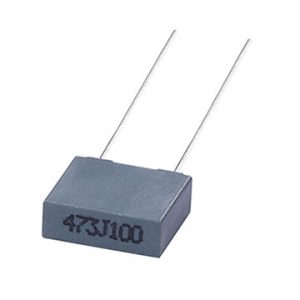
 
Installing the capacitor can help:
  • Stabilize electricity current
  • Prolong the lifespan of the switch
     
  • Reduce issues like:
    • Flickering
    • Inconsistent operation
    • Power fluctuations
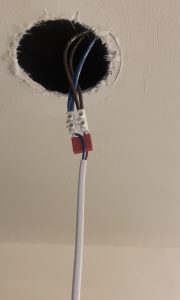
  • The capacitor is installed at the first gang light of the smart switch,  One end of the capacitor is connected to the Line (L) terminal, and the other end is connected to the Neutral (N) terminal. This configuration allows the capacitor to filter out voltage fluctuations and provide a stable power supply to the smart switch, ensuring reliable operation and prolonging its lifespan.
     
     Click here to watch the video tutorial on how to install a capacitor
     

    Note that: Capacitors have a limited lifespan, and their performance can degrade over time. Regular maintenance and potential replacement of the capacitor may be necessary to ensure continued operation of the smart switch. This additional maintenance can be an inconvenience for user without neutral wiring.
  •  

Reset Switch / Enter Paring Mode

To reset the switch and enter into pairing mode, long press the first gang/button for 10 seconds,  indicator light will start flashing, 
If there are more than 1 Zigbee device to pair into the app, you may reset all at once, and Zigbee hub will automatically search and connect devices that are within reachable range within 5 mins.

Ensure Outsmart Zigbee Hub is Connected Successfully

A Outsmart Zigbee hub is required in order to use Outsmart Zigbee products

Connect Device

  • Tap open Outsmart Zigbee Hub on home screen
  •  Tap Add New Devices
  • Ensure Zigbee Product are all in pairing mode
  • App will auto discover the product that are within range, otherwise, reset the product again
  • Rename each individual device to better identify in Outsmart app. 
 
how to activate

Voice Assistance

tap on image below for video tutorial

Remember to tag us when you post them on social media!

FAQ

I can’t connect the product, it gets timed out.

Ensure Zigbee product is in pairing mode. If Zigbee Hub is unable to find the Zigbee Switch, it may be the connection is weak, suggest to move closer or purchase a Zigbee Repeater

Product indicator light is not blinking.

Long press first button for 10s (Left side)

Light is flickering

To use a Zigbee smart switch non neutral wire, light has to be above 10w, else it will flicker. As such please wire the capacitor and securely tighten. Capacitor has to be in the first gang and first light of the switch, please refer to wiring diagram

Can I leave the last light switch empty without any output?

Yes, as long as the first switch wired to a light, the second or third switch can be empty and be used as a scene switch to turn on Aircon, tv, smart plug, note that you would require other smart devices to do that.

Can the switch be used for fan?

Yes, since August 2023, all our Wall Switches are upgraded, and it can work with Ceiling Fan, follow the installation method above, otherwise warranty will be void