




 624–840 LED Chips/m
 No dark spots
 Zigbee hub required
 RGB 16 Million Colors
 Warm to White Color


Seamless Color Experience
Experience the ultimate in vibrant ambiance with our innovative RGBCCW COB Dotless LED Strip, boasting an astonishing 16 million color options. This cutting-edge solution delivers breathtakingly bright and vivid colors, making it perfect for creating mesmerizing cove lighting in living rooms, or adding a pop of color to curtain pelmet lights. The dotless design ensures a seamless, uniform glow without visible LEDs, while its flexible and bendable nature allows for effortless conformation to any shape or surface. Whether you’re looking to add a touch of modern flair to your home decor, create an immersive entertainment experience, or simply enhance the ambiance of your living space, this RGBCCW COB Dotless LED Strip is the perfect choice. Its exceptional brightness and color consistency make it ideal for a wide range of applications, from subtle accent lighting to dazzling decorative effects that will leave a lasting impression.
Voice and App Control
Experience the convenience of voice and app control with smart lights, allowing for effortless lighting management at home. Using popular voice assistants like Google Assistant or Amazon Alexa, smart bulbs can be controlled with simple voice commands. Alternatively, Outsmart app enables users to control lighting remotely, schedule routines, and adjust brightness levels with a few taps. With seamless voice and app control, smart bulbs make it easy to create a comfortable and energy-efficient living space.

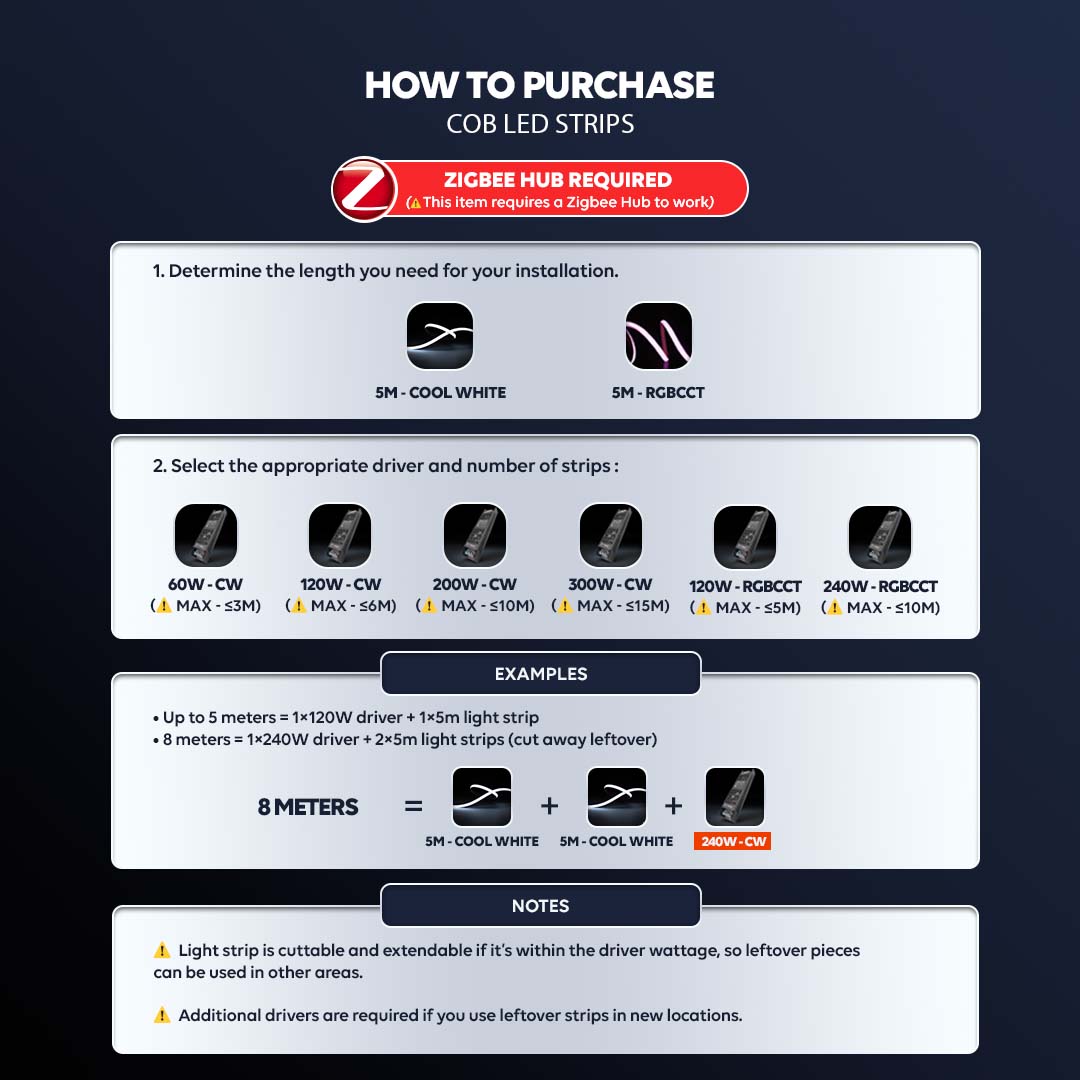
COB LED Strip – Simple & Flexible Installation
Choose the right COB LED strip setup easily. Simply determine your required length and match it with the appropriate driver. Flexible, cuttable, and easy to install for various lighting needs.
Seamless Color Experience
Experience the ultimate in vibrant ambiance with our innovative RGBCCW COB Dotless LED Strip, boasting an astonishing 16 million color options. This cutting-edge solution delivers breathtakingly bright and vivid colors, making it perfect for creating mesmerizing cove lighting in living rooms, or adding a pop of color to curtain pelmet lights. The dotless design ensures a seamless, uniform glow without visible LEDs, while its flexible and bendable nature allows for effortless conformation to any shape or surface. Whether you’re looking to add a touch of modern flair to your home decor, create an immersive entertainment experience, or simply enhance the ambiance of your living space, this RGBCCW COB Dotless LED Strip is the perfect choice. Its exceptional brightness and color consistency make it ideal for a wide range of applications, from subtle accent lighting to dazzling decorative effects that will leave a lasting impression.
Voice and App Control
Experience the convenience of voice and app control with smart lights, allowing for effortless lighting management at home. Using popular voice assistants like Google Assistant or Amazon Alexa, smart bulbs can be controlled with simple voice commands. Alternatively, Outsmart app enables users to control lighting remotely, schedule routines, and adjust brightness levels with a few taps. With seamless voice and app control, smart bulbs make it easy to create a comfortable and energy-efficient living space.
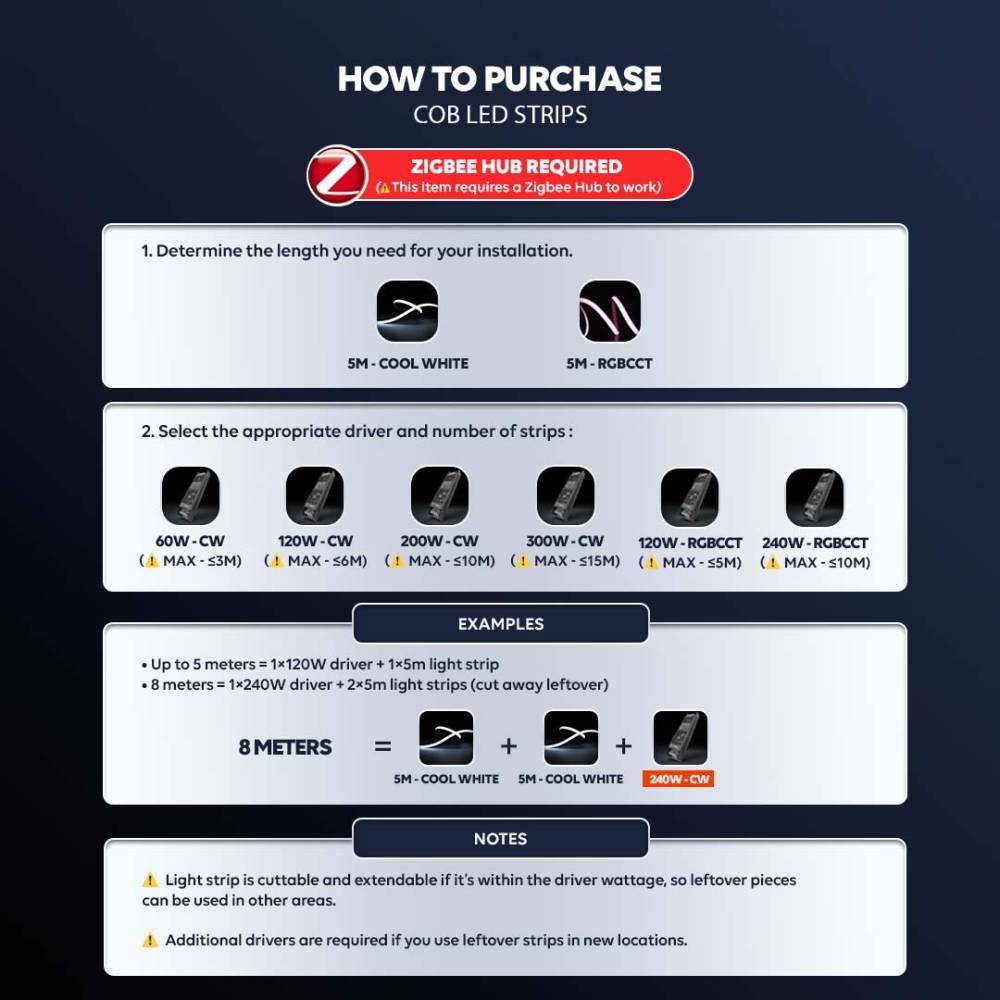
COB LED Strip – Simple & Flexible Installation
Choose the right COB LED strip setup easily. Simply determine your required length and match it with the appropriate driver. Flexible, cuttable, and easy to install for various lighting needs.
FAQ
Step 1: Connect Your Zigbee Hub
Ensure your Zigbee Hub is connected to the Smart Life App and online before pairing the LED Strip.
Step 2: Connect the LED Strip to the Driver
Follow the terminal markings on your driver:
+ → Common Positive (Red Wire)
Y / W (Warm) → Warm White (Yellow Wire)
W / C (Cool) → Cool White (White Wire)
Note: Terminal labels may vary depending on the driver version.
Step 3: Enter Pairing Mode
Turn on the power after installation.
The LED Strip should start breathing/pulsing, indicating pairing mode.
Open the Smart Life App → Zigbee Gateway → Add Device.
Wait for the LED Strip to be detected and follow the on-screen instructions to complete pairing.
Step 4: If Pairing Mode Does Not Activate
Locate the Reset button on the driver/controller near the wiring terminals.
Press and hold the Reset button until the LED Strip starts breathing/pulsing.
Return to the Smart Life App to complete pairing.
Important: Professional installation is strongly recommended. Always verify the terminal markings on your actual driver before wiring.
Step 1: Connect Your Zigbee Hub
Ensure your Zigbee Hub is connected to the Smart Life App and online before pairing the LED Strip.
Step 2: Connect the LED Strip to the Driver
Follow the terminal markings on your driver:
+ → Common Positive (Black Wire)
B → Blue Wire
G → Green Wire
R → Red Wire
W → Warm White (Yellow Wire)
C → Cool White (White Wire)
Step 3: Enter Pairing Mode
Turn on the power after installation.
The LED Strip should start breathing/blinking, indicating pairing mode.
Open the Smart Life App → Zigbee Gateway → Add Device.
Wait for the LED Strip to be detected and follow the on-screen instructions to complete pairing.
Step 4: If Pairing Mode Does Not Activate
Turn OFF the power and wait 5 seconds.
Turn ON the power for 5 seconds, then turn it OFF again.
Repeat the 5-second ON/OFF cycle 3 times.
On the next power-on, the LED Strip should start breathing/blinking.
Open the Smart Life App and pair the LED Strip through your Zigbee Gateway.
Important: Professional installation is strongly recommended. Driver terminal markings and wire colours may vary. Always verify the markings on your actual driver before wiring.
Reviews
There are no reviews yet.